What Is the Difference Between Text Extraction and OCR? (Full Guide)
If you’ve ever needed to pull information out of an image, document, or scanned file, you’ve probably come across the terms text extraction and OCR. Most users treat them as the same, but they aren’t. Understanding the difference helps you choose the right tool—especially when using online converters like the image to text converter.
Text extraction and OCR both serve the purpose of converting content into editable digital text, but each one works differently and is ideal for different use cases. Let’s break everything down in a simple, beginner-friendly way.
What Is Text Extraction?
Text extraction refers to pulling meaningful information out of a digital source. This could be a document, a PDF, a text-based file, or even structured data already stored in a digital format.
How Text Extraction Works
Text extraction usually involves software that identifies:
- Specific words
- Keywords
- Patterns
- Entities (names, emails, dates)
- Pre-structured data
It works best when the source content is already digital and machine-readable.
Example
If you upload a text-based PDF, a text extraction tool can pull emails, dates, headings, or specific strings instantly. No scanning is required.
What Is OCR (Optical Character Recognition)?
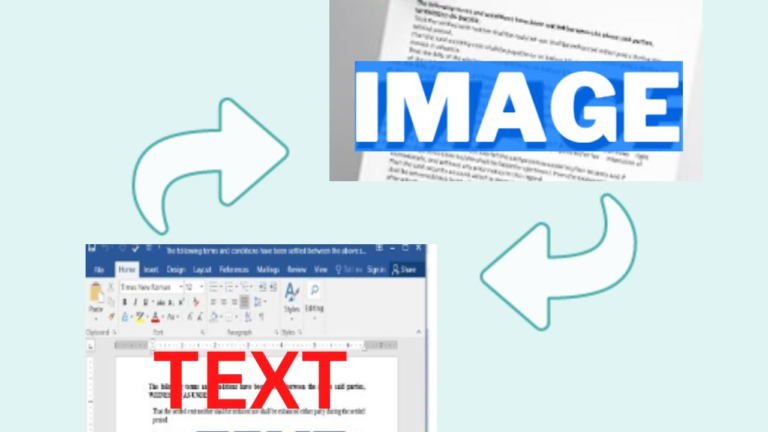
OCR is a technology that reads text from images, scanned files, photographs, and printed documents. It converts visual characters into machine-readable text using recognition algorithms.
You can try it using tools like this online OCR converter, which quickly transforms photos into text.
How OCR Works
OCR includes:
- Character recognition
- Pattern identification
- Layout reading
- Text reconstruction
- AI-based correction
It’s ideal when the content is not digital—for example, printed pages, handwritten notes, or photographed documents.
Key Differences Between Text Extraction and OCR
Understanding the difference helps you choose the correct method for your workflow. Here’s a simple, easy-to-understand comparison:
1. Input Type
- Text Extraction: Works on digital files where text already exists.
- OCR: Works on images or scanned files where text must be recognized from shapes and characters.
2. How It Processes Data
- Text Extraction: Finds and extracts text or data directly.
- OCR: Converts visual text into digital text.
3. Use Cases
- Text Extraction: Emails, digital PDFs, CSV files, digital contracts.
- OCR: Photos, camera images, handwritten notes, scanned receipts.
4. Accuracy Differences
- Text Extraction: Very high because text is already digital.
- OCR: Depends on image quality, lighting, font style, and clarity.
5. Required Technology
- Text Extraction: Standard parsing or NLP tools.
- OCR: Needs AI, machine learning, and computer vision algorithms.
When Should You Use Text Extraction?
Choose text extraction when:
- Your file contains selectable text.
- You want to extract structured data (emails, names, numbers).
- You are analyzing datasets or digital documents.
Example: Extracting invoice numbers from a digital PDF.
When Should You Use OCR?
Choose OCR when:
- Your content is in an image format.
- You have old scanned documents.
- You want to digitize printed pages.
- You need handwriting recognition.
Try using an OCR-based image to text tool for converting photos into editable text.
Text Extraction vs OCR: Which One Is Better?
Neither is “better”—they serve different purposes.
- Use text extraction when text already exists digitally.
- Use OCR when text exists visually and needs to be recognized.
In many workflows, businesses combine both. For example, OCR converts a scanned contract into text, and then extraction tools analyze and pull important details.
Benefits of Using an OCR + Text Extraction Workflow
If you handle large documents or daily files, combining both technologies can boost accuracy and speed.
1. Improved Data Accuracy
OCR extracts the text → extraction tools refine and filter it.
2. Faster Document Processing
Perfect for offices handling invoices, forms, or legal papers.
3. Better Automation
Data can be automatically pushed into software, spreadsheets, or CRMs.
4. Ideal for Digital Archiving
Old documents become searchable and editable.
Try our image to text converter to test the difference yourself.
FAQs (People Also Ask)
1. Is text extraction the same as OCR?
No. Text extraction pulls data from digital text, while OCR converts visual text (images) into digital text.
2. Which is more accurate: text extraction or OCR?
Text extraction is usually more accurate because digital text is easier to parse. OCR accuracy depends on image quality.
3. Can OCR extract handwriting?
Yes, modern OCR can recognize handwriting, but accuracy varies based on readability.
4. Do I need OCR for PDFs?
If your PDF contains scanned or photo-based content, you need OCR. If the text is selectable, extraction is enough.
5. Which tool is best for converting images to text?
Online tools like fromimagetotext.com offer fast OCR conversion for photos and scanned documents.
Conclusion
Text extraction and OCR are often confused, but they solve different problems. Text extraction pulls data from digital documents, while OCR reads text from images. Together, they provide a powerful way to process information quickly, automate workflows, and digitize your files.
If you want to try OCR immediately, use the image to text converter and see the difference yourself. Don’t forget to share this guide with anyone who might find it useful!